Here we list some frequently asked questions and answers relating to x431 diagun.
About Online Update
Question: Downloaded diagnostic program package is not listed in the update tool, what is the reason?
Answer: possible causes and solutions:
1. The downloaded diagnostic program and diagnostic update tool should be in the same folder. Please put them in the same folder.
2. The diagnostic update program may have not been fully downloaded. Please download again.
Question: When the updated software is used in vehicle diagnosis, some diagnostic program can not be downloaded successfully from the TF card. Why?
Answer: possible causes and solutions:
1. The Display Program may have not been updated. Please update the Display Program.
2. The car diagnostic tool
program for the vehicle may be damaged. Please re-download the diagnostic program and update.
About Hardware
Question: Why the LCD touch screen responds so slowly in cold weather?
Answer: It is because the ambient temperature is close to the lower limit of operating temperature range (0-50 ℃). In this situation, it is necessary to warm up the machine for 30 minutes before test.
Question: Why there is no character on the backlit screen?
Answer: Check if the power is well connected. Turn off the machine, unplug it and then plug it again for power supply, one second later, try to turn on the machine.
Question: Why X-431Diagun fails in communication with ECU?
Answer: Please check and make sure that the diagnostic connector and diagnostic program are matching the vehicle make.
Question: The screen keeps blank after flashing when the machine is turned on.
Answer: Take out the TF card and re-start the machine to check if there is normal display. If the display is normal when the TF card is taken out, the TF card should be replaced. If the screen is still blank, please contact the local service engineer.
Question: Why can't the data be input after Soft Keyboard is activated?
Answer: The position where the cursor locates can't be edited. Or you have not activated the cursor in the input position, please use the stylus to click the part to edit. You can input the data if the cursor flashes.
Question: Why the saved data disappeared?
Answer: There are two possible causes:
1. Your TF card is damaged.
2. You've changed language, which is related to the data. You may find the data after switching back to the former language.
Question: The screen does not respond or responds incorrectly when click with stylus.
Answer: It is necessary to calibrate the screen.
Question: What can I do when the screen is confused?
Answer: Please quit the current application (interface), and run it again. If the problem still exists, please restart the system.
About System Setting
Question: The screen is inactive after the cross cursor appears.
Answer: The system is calibrating the touch screen. The machine will work after the calibration completed. Please see "Calibrate Touch Screen" for details.
Question: The screen does not respond or responds incorrectly when click with stylus.
Answer: It is necessary to calibrate the screen.
Question: The time displayed in the bottom right-hand corner of the screen is incorrect. How to adjust it?
Answer: The time was set incorrectly.
About Operation
Question: System halts when reading data stream. What is the reason?
Answer: It may be caused by a slackened connector. Please turn off the machine, firmly connect the connector, and switch on the machine again.
Question: The appliance is blank screened after a while during its
operation.
Answer: Power saving was set in the power management. Press power key to resume it. Or you can set ‘None' or extend the standby time in Power Off interface.
Other questions
Question: Screen of main unit flashes at engine ignition moment.
Answer: Caused by electromagnetic disturbing, and this is normal phenomenon.
Question: Diagnose interrupted during diagnosing process.
Answer: Caused by electromagnetic disturbing or poor connecting.
Question: There is no response when communicating with on-board computer.
Answer: Please confirm the proper voltage of power supply and check if the throttle has been closed, the transmission is in the neutral position, and the water is in proper temperature.
Question: The systems equipped with the vehicle can not be diagnosed.
Answer: DLC of some early models is separated; refer to User's Manual for details.
Question: The fault code storage is blank.
Answer: Usually, it's the "suquela" for shared circuit. Please locate and analyze the most similar fault code and its circuit.
Question: There is so much fault code.
Answer: Usually, it's caused by poor connection or fault circuit grounding.
Please check and confirm if the Year and make selected is correct or not and if the vehicle is equipped with the right system.
Refer:http://www.obdscanner.us/some-frequently-asked-questions-and-answers-relating-to-x-431diagun.html
Showing posts with label x431 diagun. Show all posts
Showing posts with label x431 diagun. Show all posts
Monday, December 24, 2012

Monday, December 10, 2012
Some FAQ about car diagnostic tool
Some FAQ about car diagnostic tool:
Question: Why is there no character in the printed paper?
Answer: The paper is mounted reversely. Please take out the paper and mount it again. See the section "Printer Operation" in the User's Manual.
Question: Why can't I input data after activating Soft Keyboard?
Answer: The position where the cursor lies can't be edited. Or you have not activated the 0cursor on the input position. Use the stylus to click the part to edit. When the cursor twinkles, you can input the data.
Question: What should I do if I am not able to switch from Active Taskbar to the running application interface?
Answer: Please close interfaces related to the application, such as the Help or Detail.
Question: Why does the saved data disappear?
Answer: There are two possible causes:
1. Your CF card is damaged. It is necessary to make a new CF card.
2. You've changed language and the data is related to language. You may find the data after switching back to the former language.
Question: What can I do when the screen is confused?
Answer: Please quit the current application (interface), and run it again. If the problem still exists, please restart the system.
Question: How to know what applications (interfaces) are opened.
Answer: Click the active taskbar icon, then the pop-up list will display the applications (interfaces) opened.
Question: Why can't I do operation in current interface?
Answer: There are two possible causes:
1. Your current interface has exited illegally. In this situation, you may not see the name of the application (interface) in the pop-up list when you click the active taskbar icon.
2. The system is busy, please wait patiently, or click the active taskbar icon to switch to another application.
The Vtoolshop also have more obd code reader and x431 diagun for sale.
Question: Why is there no character in the printed paper?
Answer: The paper is mounted reversely. Please take out the paper and mount it again. See the section "Printer Operation" in the User's Manual.
Question: Why can't I input data after activating Soft Keyboard?
Answer: The position where the cursor lies can't be edited. Or you have not activated the 0cursor on the input position. Use the stylus to click the part to edit. When the cursor twinkles, you can input the data.
Question: What should I do if I am not able to switch from Active Taskbar to the running application interface?
Answer: Please close interfaces related to the application, such as the Help or Detail.
Question: Why does the saved data disappear?
Answer: There are two possible causes:
1. Your CF card is damaged. It is necessary to make a new CF card.
2. You've changed language and the data is related to language. You may find the data after switching back to the former language.
Question: What can I do when the screen is confused?
Answer: Please quit the current application (interface), and run it again. If the problem still exists, please restart the system.
Question: How to know what applications (interfaces) are opened.
Answer: Click the active taskbar icon, then the pop-up list will display the applications (interfaces) opened.
Question: Why can't I do operation in current interface?
Answer: There are two possible causes:
1. Your current interface has exited illegally. In this situation, you may not see the name of the application (interface) in the pop-up list when you click the active taskbar icon.
2. The system is busy, please wait patiently, or click the active taskbar icon to switch to another application.
The Vtoolshop also have more obd code reader and x431 diagun for sale.
Monday, June 18, 2012
The China Launch X431 Diagun Technology Introduction
The launch x431 diagun is popular ,this tool is widely used all over the world you can see the red box and the yellow box.so first ,let give your a detail about the launch x431 .
Launch is the most popular company from China who are engaging professional car diagnostic tools. From 1992, Launch always product the most popular tools. For car owner diy car code reader, Launch CReader V, Creader VI and CRecorder, the items are so popular in world. It is with easy operation and can update online of www.crecorder.com directly.
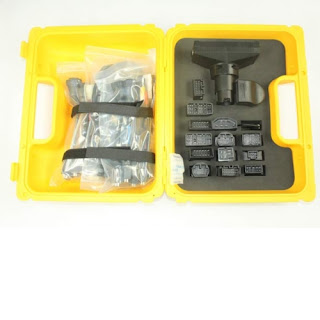
Launch x431 diagun which you can see is good tool for check your car fault ,It's widely in the obd ii market , you can use this tool for you car and to fix your car well , here you can see the images of the launch x431 diagun:


Here is the pdf article you can see :
http://www.vtoolshop.com/upload/pdf/launch-x431-diagun.pdf
Launch x431 Diagun details:
Light weight and ultra-mobile
Wireless Bluetooth data transfer up to 25 meters
Enough 1 GB storage capacity on a mini-SD memory card. Large amount of stored codes or diagnostics
values be saved.
Reading and erasing trouble codes
Live-vehicle data streams (customizable)
Actuator test
System search for several manufacturers
Daily access to software downloads through the internet
LAUNCH X-431 DiagunLAUNCH
WAS GmbH – Werkstatt Ausrüstung & Services, Steinhof 63, 40699 Erkrath
Tel: 0211/ 92 968 5-0 Fax: 0211/ 92 968 5-22 E-Mail WAS-TEAM@was-services.com
Internet : was-services.com
Working with the X-431 DIAGUN enables you to:
- Reading and erasing stored trouble codes (DTC)
- Display of error codes as code number and description
- Display live data streams and customized data lists
- Delete auto-adaptive values (engine or automatic transmission)
- Basic settings (TPS throttle, ESP, transmission)*
- Coding and Programming (Depending on manufacturer)
- Service interval reset (long life service, particle filter maintenance)
- Calibration (injector calibration FORD, Renault, MAZDA)
- Reset language of instrument cluster
- Key Coding
- CAN-BUS Diagnostics
- Xenon Light Support and Basic Settings
- Comfort Systems (Seat, Door, Navigation)
- Maintenance support: Reset of parking brakes (SBC, EPB), ABS bleeding
If you think this tool is suitable for you car you can ask me for more information:kingstar@vtoolshop.com
Launch is the most popular company from China who are engaging professional car diagnostic tools. From 1992, Launch always product the most popular tools. For car owner diy car code reader, Launch CReader V, Creader VI and CRecorder, the items are so popular in world. It is with easy operation and can update online of www.crecorder.com directly.
Launch x431 diagun which you can see is good tool for check your car fault ,It's widely in the obd ii market , you can use this tool for you car and to fix your car well , here you can see the images of the launch x431 diagun:


The red box diagun and the yellow box diagun.
Here is the pdf article you can see :
http://www.vtoolshop.com/upload/pdf/launch-x431-diagun.pdf
Launch x431 Diagun details:
Light weight and ultra-mobile
Wireless Bluetooth data transfer up to 25 meters
Enough 1 GB storage capacity on a mini-SD memory card. Large amount of stored codes or diagnostics
values be saved.
Reading and erasing trouble codes
Live-vehicle data streams (customizable)
Actuator test
System search for several manufacturers
Daily access to software downloads through the internet
LAUNCH X-431 DiagunLAUNCH
WAS GmbH – Werkstatt Ausrüstung & Services, Steinhof 63, 40699 Erkrath
Tel: 0211/ 92 968 5-0 Fax: 0211/ 92 968 5-22 E-Mail WAS-TEAM@was-services.com
Internet : was-services.com
Working with the X-431 DIAGUN enables you to:
- Reading and erasing stored trouble codes (DTC)
- Display of error codes as code number and description
- Display live data streams and customized data lists
- Delete auto-adaptive values (engine or automatic transmission)
- Basic settings (TPS throttle, ESP, transmission)*
- Coding and Programming (Depending on manufacturer)
- Service interval reset (long life service, particle filter maintenance)
- Calibration (injector calibration FORD, Renault, MAZDA)
- Reset language of instrument cluster
- Key Coding
- CAN-BUS Diagnostics
- Xenon Light Support and Basic Settings
- Comfort Systems (Seat, Door, Navigation)
- Maintenance support: Reset of parking brakes (SBC, EPB), ABS bleeding
If you think this tool is suitable for you car you can ask me for more information:kingstar@vtoolshop.com
Subscribe to:
Posts (Atom)